
Premier - How Do I Block Unwanted Calls with Call Blocking?
Learn how to block spam calls and robocalls so they never reach your business phone lines.
Call Blocking helps keep annoying spam calls and robocalls away from your business. This feature is available on the Business Premier plan. Once you block a number, anyone calling from it will hear a busy signal instead of reaching your phone. You can also unblock a number at any time. Here’s how.
🚫 How to block a number
- Log in to your Voiply portal at https://www.voiply.com/portal (opens in a new tab)
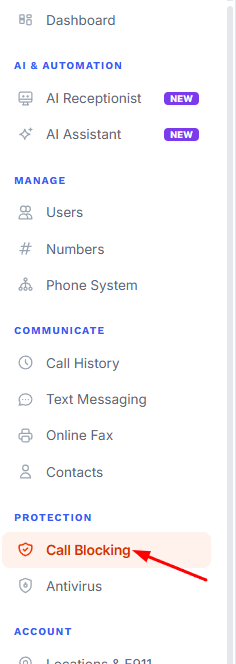
- Look at the menu on the left side of the screen. You may need to scroll down a little.
- Find the section called Protection.
- Click Call Blocking.
- Under Block a Number, click inside the box that says “Enter phone number to block.”
- Type the 10-digit phone number you want to block. You don’t need to add the country code. Voiply adds it for you automatically.
- Click the Block button on the right. This button may look faded until you type a number.

- The number now shows up in your Blocked Numbers list. Anyone calling from that number will hear a busy signal instead of ringing through to you.
Tip: At the top of the page, under the words “Call Blocking,” you can see how many numbers you have blocked.
✅ How to unblock a number
- Go back to the Call Blocking page. In the left menu, look under Protection and click Call Blocking.
- Scroll down to your Blocked Numbers list.
- Find the number you want to unblock.
- Click the small trash can icon on the far right side of that number’s row.
- The number is removed from your list right away. Calls from that number can now reach your business lines again.
Still need help?
If you run into any trouble, our support team is happy to help. Contact Voiply Support
Did this answer your question?
Glad it helped.