
How to Make a Payment for a Past-Due Account
If a payment didn't go through, you can pay it yourself from the Billing page in your Voiply portal. Once it's paid, your service turns back on automatically.
Step 1: Open your Billing page
Go to voiply.com/portal/billing (opens in a new tab) and sign in. If you're already signed in, click Manage under Billing on your dashboard. For help signing in, see How to Access Billing in Your Voiply Portal. 
Step 2: Check what you owe
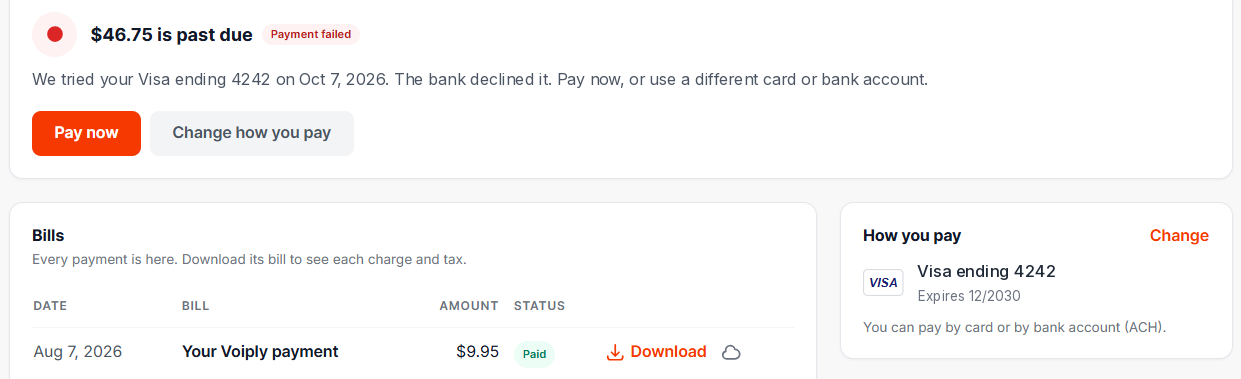
At the top of the page, you'll see the amount that's past due and why the payment didn't go through. For example: "We tried your Visa ending 1234 on Oct 7, 2026. The bank declined it."
Step 3: Pay the bill
Click Pay now. A payment window opens showing the amount due.
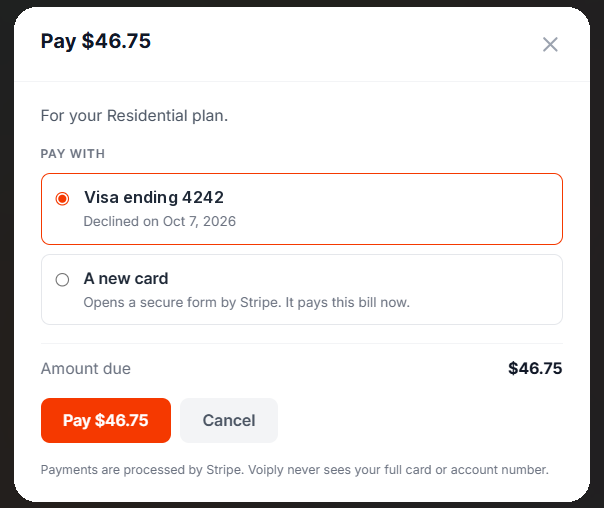
Under Pay with, choose how to pay:
- Your card on file. If this card was declined before, you'll see that here. You can try it again if the problem has been fixed, for example if you've added funds.
- A new card. This opens a secure form by Stripe where you can enter a different card. If your card on file was declined, the new card will also pay your future bills. You'll see a message confirming this after you pay.
Then click the Pay button (it shows the amount, like "Pay $46.75").
Past-due bills can only be paid by card. A bank account takes about 4 business days to clear, so it can't be used for a late bill. You can still add a bank account for your future bills. See How to Update Your Payment Method.
If you have a bank account saved, you'll see it in the window, but it can't be selected for a past-due bill.
Step 4: Your service turns back on
Once your payment goes through, your service turns back on automatically. You don't need to call us. If you had more than one unpaid bill, all of them need to be paid first.
Your payment will then appear in the Bills section with a Download button, so you can get a copy of the bill.
If your payment doesn't go through
Check that the card number, expiration date and security code are correct, and that the card has enough funds. You can also try a different card. If it still won't go through, call us at (844) 843-4175 or email billing@voiply.com. We're happy to help.
Did this answer your question?
Glad it helped.